
Tabs
Tabs allow extensions to add additional tabs to existing Administration pages.
They are commonly used to extend entity detail pages such as products, customers, or orders.
addTabItem()
Add a new tab item to an existing tab bar. The content of the new tab item contains a component section. This works with tab bar's which have routing and also static tab bars. If the tab bar has routing then the route for the tab item will be generated automatically.
Usage
ts
import { ui } from '@shopware-ag/meteor-admin-sdk';

ui.tabs('sw-product-detail' /* The positionId of the tab bar*/).addTabItem({
    label: 'Example tab',
    componentSectionId: 'example-product-detail-tab-content'
})
Parameters
| Name | Required | Default | Description |
|---|---|---|---|
label | true | The label of the tab bar item | |
componentSectionId | true | The Id for for the component section in the tab content |
Return value
Returns a promise without data.
Example
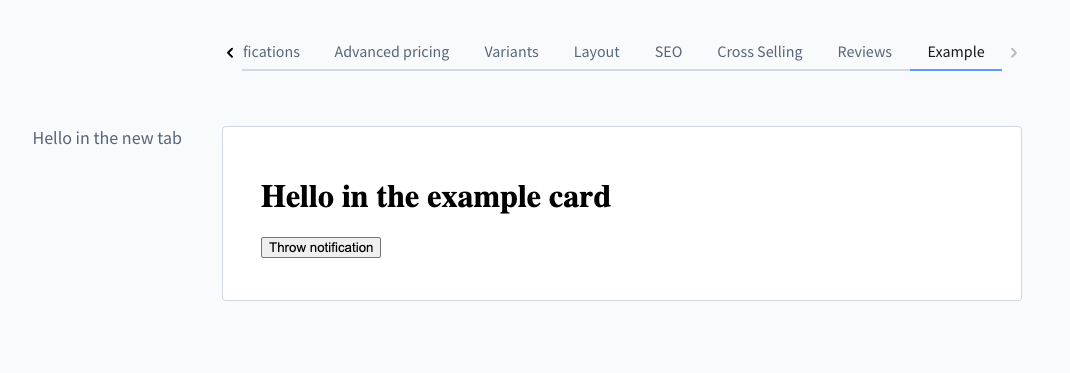
ts
import { location, notification, ui } from '@shopware-ag/meteor-admin-sdk';

// For general commands
if (location.is(location.MAIN_HIDDEN)) {
    // Add tab bar item
    ui.tabs('sw-product-detail').addTabItem({
        label: 'Example',
        componentSectionId: 'my-awesome-app-example-product-view'
    })

    // Add component to the new created section
    ui.componentSection.add({
        component: 'card',
        positionId: 'my-awesome-app-example-product-view',
        props: {
            title: 'Hello in the new tab',
            locationId: 'my-example-product-view-tab-card'
        }
    })
}

// Render custom view of the component
if (location.is('my-example-product-view-tab-card')) {
    document.body.innerHTML = `
        <h1>Hello in the example card</h1>
        <button id="show-notification">Throw notification</button>
    `;

    document
        .getElementById('show-notification')
        ?.addEventListener('click', () => {
            notification.dispatch({
                title: 'Foo',
                message: 'bar',
            });
        });
}